
In this guide, we will explain what Google Business Profile is, why it is important, how to create and optimize it, and how to rank it on Google Maps to get more calls, leads, and sales for your business.
Many businesses in Pakistan do not even have an idea that they can list their business on Google Maps and get sales from there. Even in this advanced age of technology, where everything is shifting towards online because of speed, scalability, and efficiency, Pakistani local businesses are unaware that there is a product from Google with the name Google Business Profile, with the help of which you can create a Google map listing for your local business.
By doing this, your business is against all those search queries that people are using to get your services and products.
Now, many people confuse that google map seo is for big brands and big businesses, but they are wrong; it is an equal opportunity for both, a big brand in Lahore with a team of 100 people selling t-shirts and a small shop with 2 to 3 people, to list their business on Google Business Profile and become visible to local customers.
It was just a simple example, now it’s a great opportunity for every type of business, like restaurants, clinics, dentists, electricians, plumbers, doctors, technicians, lawyers, real estate agents, and local shops, like a bakery.
Now lets discuss why it is important for you to set up a Google Business Profile and how I can help you to get more visibility, calls, leads, and customers.
According to stats, almost 46% of all the searches on Google are local, and out of which 60% clicks go to Google Map pack, which means if you are a local business, and you are listed on Google Maps, then you are losing customers to those who are on Google Maps and consistently investing in google map seo.
Below you can see a simple example of my own local agency business profile, which is ranking on top of Google Maps when someone searches for “digital marketing agency near me” or “digital marketing agency Okara”.
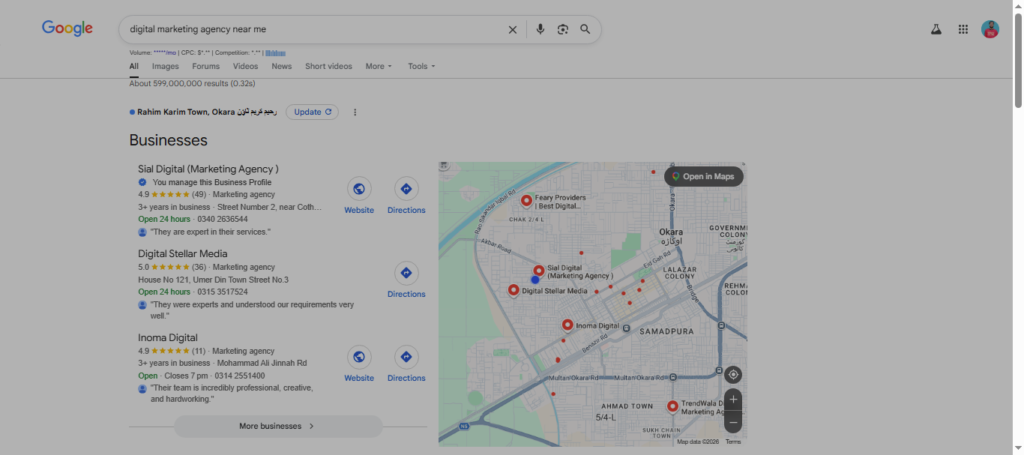
I have already posted a complete case study of how I ranked my Google Business Profile on Google Map Pack in 15 days; you can read it here.
What is Google Business Profile?
Google Business Profile(GBP) is a product from Google for all local businesses in the world to list their business on Google Maps. By doing this, people will be able to easily find your business, contact you, and reach you.
Difference between GMB & GBP
Many people often confuse Google My Business and Google Business Profile, but here is the thing: they both point to the same thing, which is Google Business Profile. In 2022, Google has rebranded Google My Business to Google Business Profile, all in one place to manage your local business profile.
You can easily view your business, manage it, make some changes like updating the name, description, business hours, etc., and even remove it.
How Google Business Profile and Maps Work in Local SEO?
Now, let’s discuss Google Maps. I am assuming that you know nothing about anything related to local seo, that’s why I am explaining to you everything in detail, because basics are very essential, without them, you will read this complete guide, but will not be able to rank your business in local maps.
Google Maps tracks your GPS location, and helps you navigate different cities, countries, countrie and areas even in your small town.
Now, let’s discuss how it is related to google map seo, when you list your business on Google Business Profile, it takes your address, and then links that address or location to your business.
When someone searches for your business or services, Google’s local algorithm recommends your business to that user.
If you do not have many ideas about the big picture of local SEO, I have a complete guide to local SEO for small businesses.
Why GBP Matters for Pakistan Businesses
As we discussed earlier, how Google Business Profile links your business with Google Maps, now that you have listed your business on Google Maps, you will be visible to all those people who will be in your service area. As a result, your business will get more interaction, trust, visibility, calls, sales, and local area branding.
If you properly optimize your local business profile, I guarantee you will see phenomenal business growth in your business.
Stats show that almost 88% percent customers trust online reviews, and nowadays most of the customers do research about businesses before purchasing their services. In short, you should be present where your customers are.
Below you can see when I search about seo agency near me, my Google Business Profile is showing.
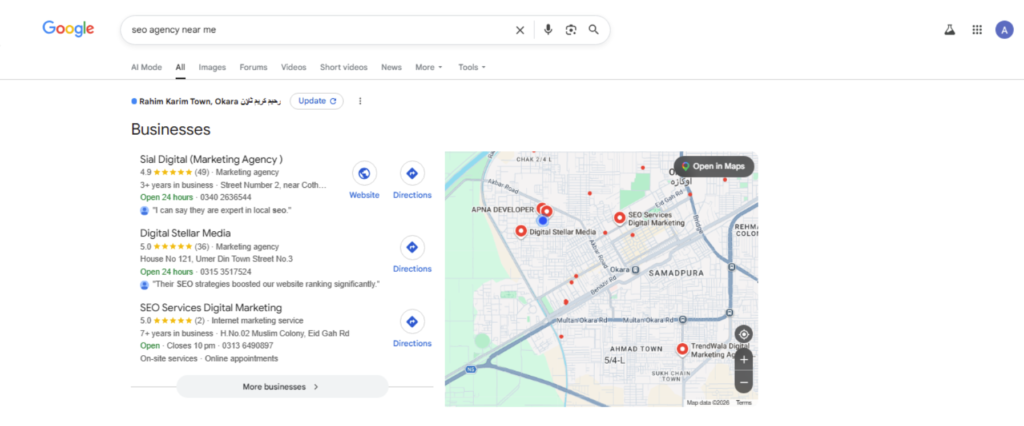
How Google Maps Rankings Work in Pakistan
Understanding how ranking works for Google Maps is essential because our ultimate goal is to rank our local business at the top of Google local search results.
So the algorithm, which is responsible for the ranking of Google Maps, is the Google local algorithm. There is preset criteria based upon this algorithm that ranks your business profile in Google Maps pack 3.
Three main factors determine the position of your business profile in local search results: Relevance, Prominence, and Proximity.
Relevance:
How relevant your Google map listing is to a particular research query or keywords. For example, if someone is searching for “digital marketing agency near me, then have you mentioned that keyword in your Google Business Profile? Is it related to your business profile category?.
Proximity:
Proximity means how far you are from the customer search location; the closer, the better effect.
For example, there are two businesses on Google Maps, and both are plumbers. Now, when some one will search about “plumber near me”, Google will show you the business that will be near you.
Prominence:
Prominence refers to how authentic, real, and trustworthy your business is. Google local algorithms determine it by checking your reviews, ratings, citations, local links, etc.
Now listen to me carefully, I am not another guy who starts preaching about google map seo without any portfolio and practice, I am a real practitioner of local search marketing.
The factors we have discussed above are the major factors, which are calculated based upon :
GBP Category:
The Google Business Profile category is a major ranking factor that also contributes to your Google map ranking against a search query. For example, if someone is searching “marketing agency near me”, and your business profile category is Marketing agency, then this will be a plus point for your local business profile.
GBP Reviews:
Google Business Profile reviews are also a ranking factor in local search research; the more reviews, the better, but now here I am not saying high reviews are the best. What I mean is that high-quality, real, location, and business-specific reviews will matter more. For example, most of our reviews say you are an affordable marketing agency, so when some will search about that key term, you will rank higher, because it increases the relevance against that query.
There is so much that I want to share with you, based on my real-world project experience, but we will stick to the content of today’s topic, which is specifically about local seo for maps.
Website SEO:
Yes, for better results and map pack 3 ranking, your website needs to be properly optimized for search engines, again google local algorithm checks how relevant your website is against search queries. For example, if someone is searching for” digital marketing agency in Okara,” if this search phrase is on your website and you have done proper keyword research for your local business website and optimized it against those search terms about which people are searching for your services and business, there will be a greater chance for you to rank on the Google map pack.
Citations:
Citations refer to mentions of your business Name, Address, and Phone Number on different websites and business directories. Most people do not understand the logic behind it, so the logic is that more citations means more signals of trust and authority, which leads to an increase in prominence factor, which is a major ranking factor in map seo.
Local Links :
This refers to how many local businesses, news websites, are linking to you, mentioning you, and preferring you. This again has an impact on prominence, which is a major ranking factor in Map Pack ranking.
How to Create a Google Business Profile in Pakistan
Let me teach you how to create a Google Business Profile for your business step by step.
First of all, you will go to Google My Business profile, and there, click on the start now button as seen in the image below
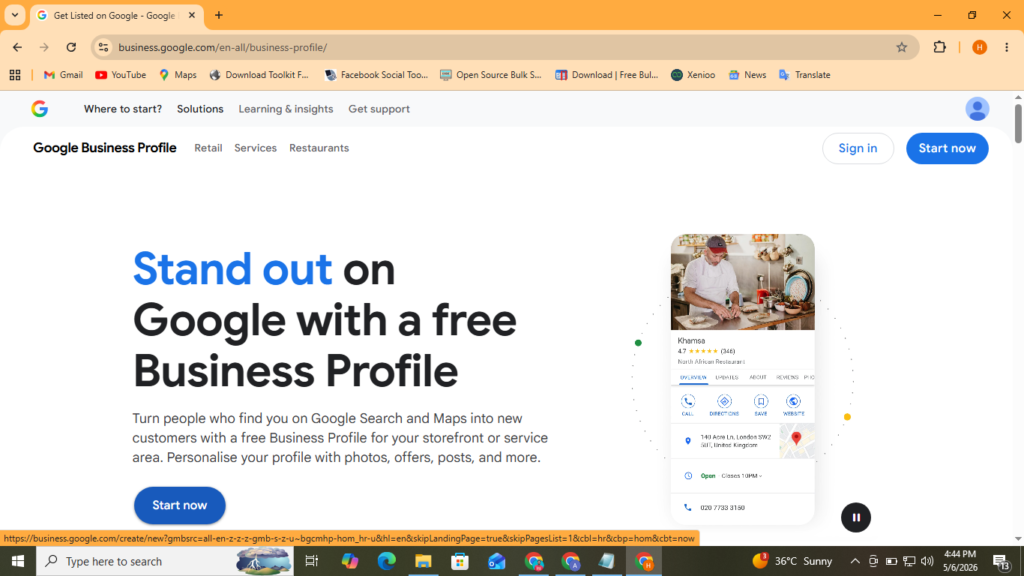
After that, you need to add your local business profile name. For example, I am choosing Plumber Okara, and after that, I click on Continue.
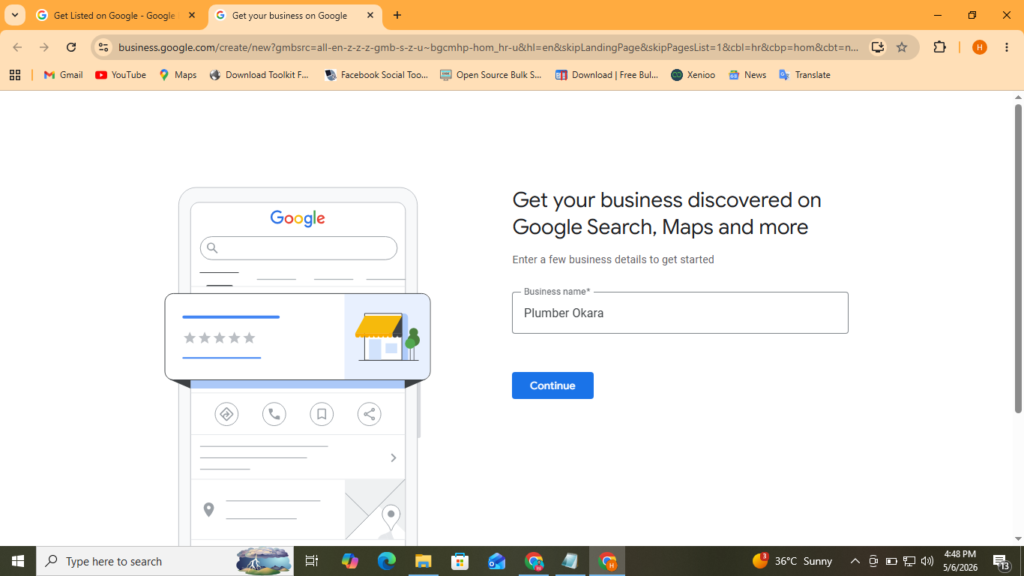
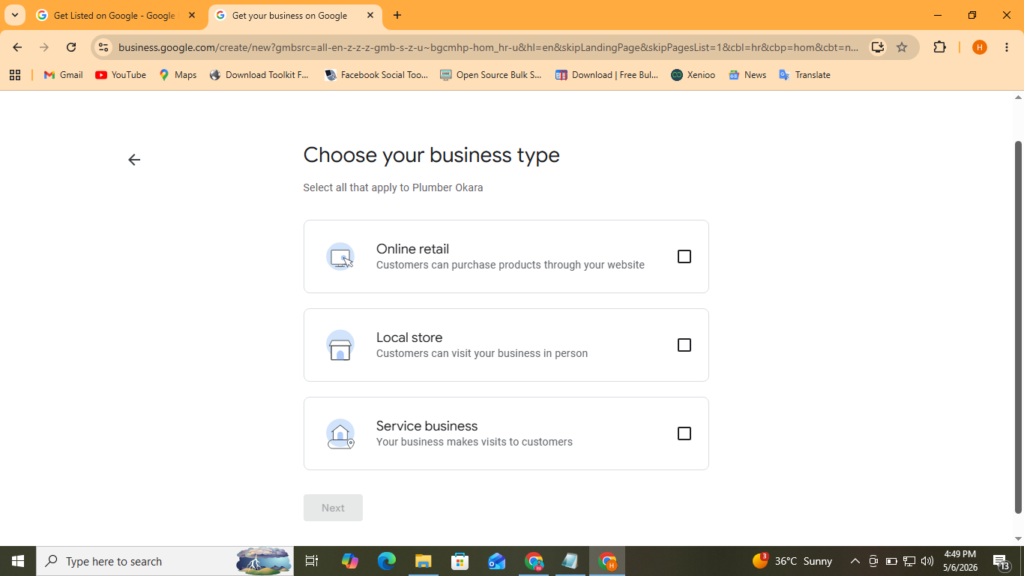
After that, it will show you three options to choose from, like online store, physical store, service-based business, and click next. I am sharing the image below
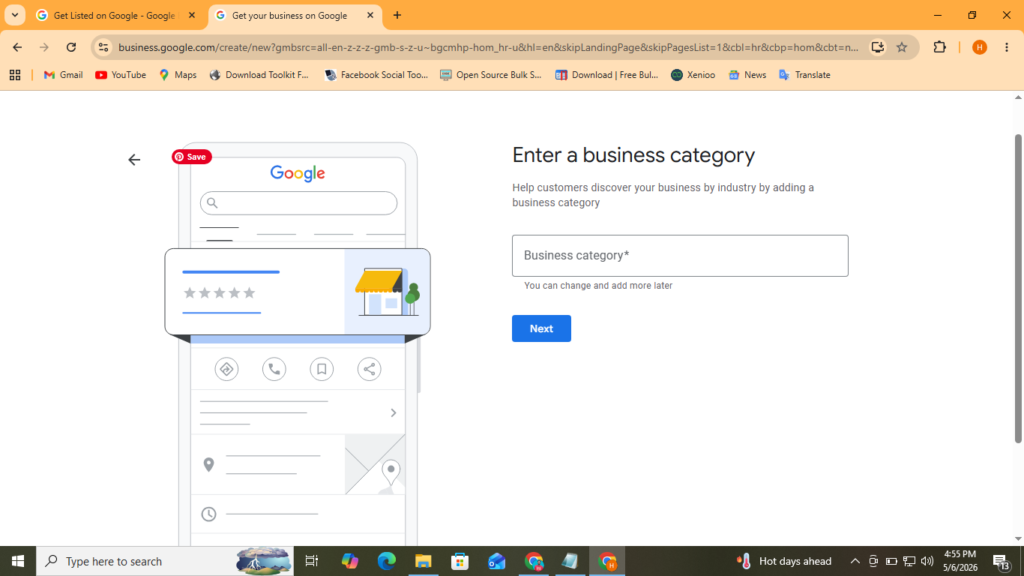
After that, it will show you how to choose a category for your local business profile. I am choosing plumber because it matches best with my business. After that, click on Next.
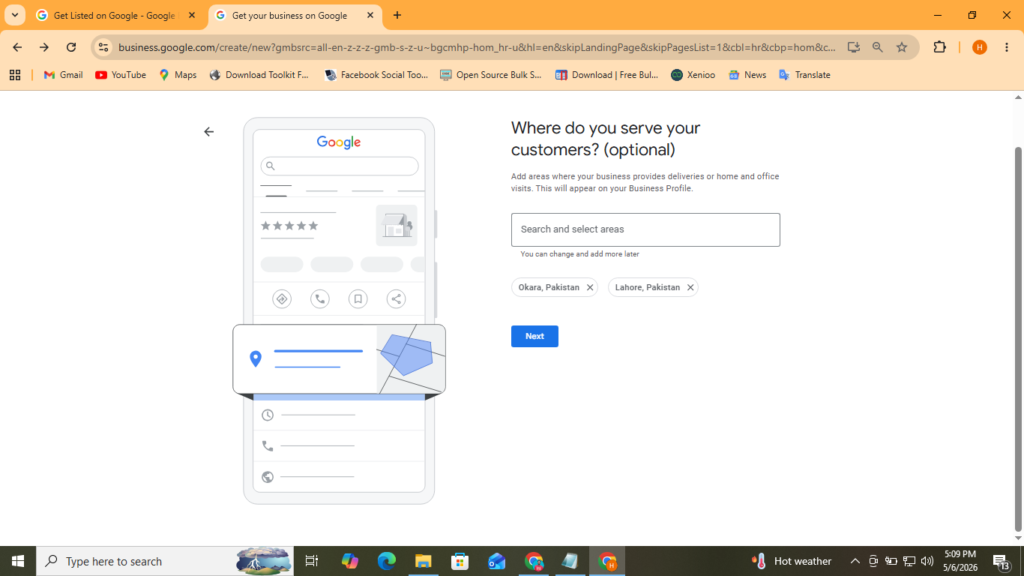
Now if will show you choose your service area, now here i want to mention that since the nature of my buisness is Service base, go back just two step back in your head, the type i choose for my business was dervice base, so that s why google is showing me to choose my service area, if you choose online store or physical store, then this option will be different and in that case may be you need to give your location.
So after adding my service area, I am clicking on next.
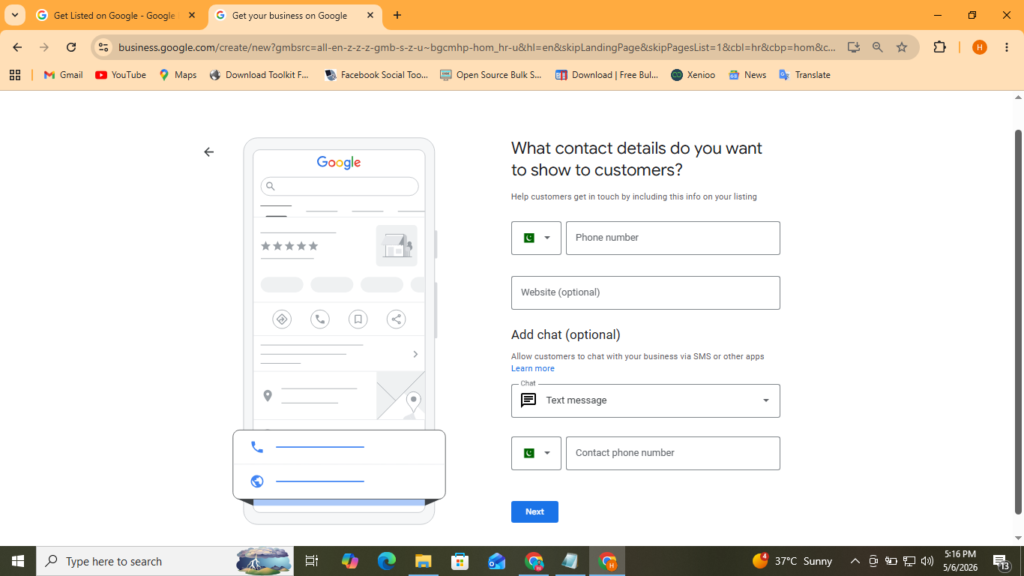
After that, it will ask you for your phone number, which will be attached to your Google Business profile. Sometimes Google sends a verification code to that number to verify you, sometimes it takes your address, and it takes 2 to 3 days to verify your business. And also store front images, in case of a physical business, for verification.
Now, after submitting my phone number, I will click Next.
After that, you will see a basic permission page, check boxes, and then click submit.
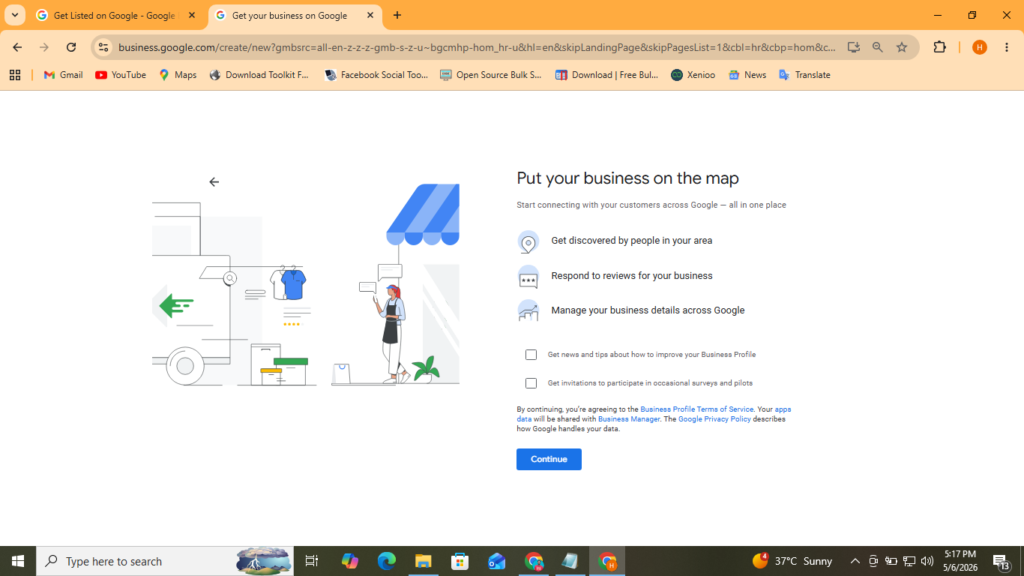
Now, after this, all Google systems will ask you about your address. You have to fill in your address, with the address line, area, town, and country, and then click next.
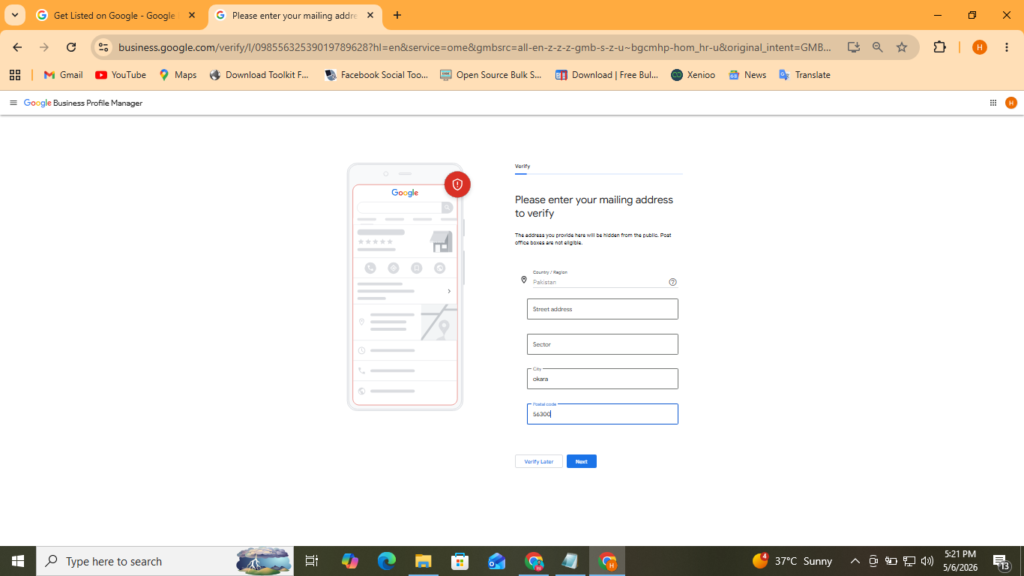
Now, after that, it will show you two options: whether you want to verify your Google Business Profile with a phone number or a Business Video. Now, again i am clarifying, based upon your profile and selection, there can be some difference. So here I am selecting verification with Phone code.
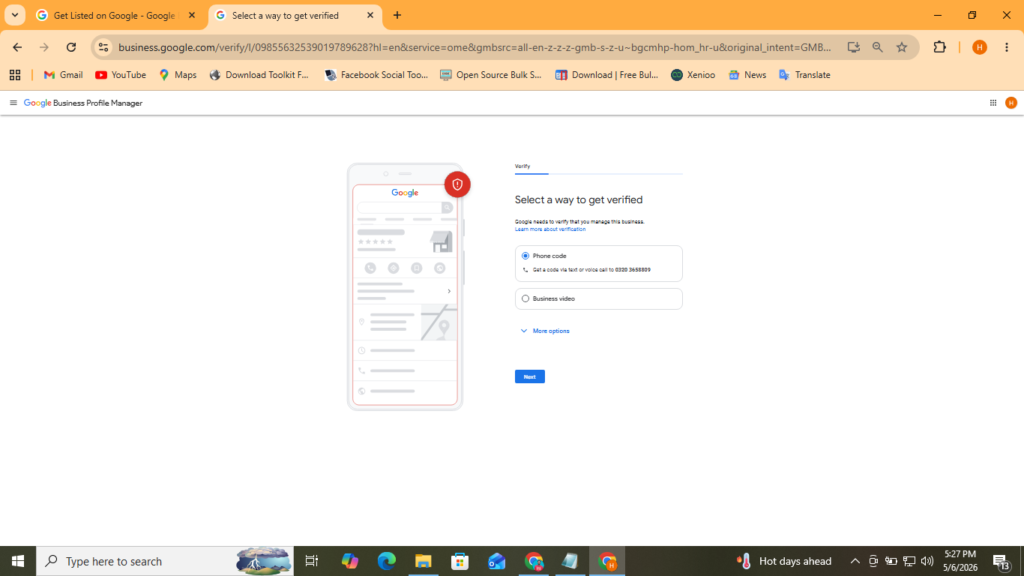
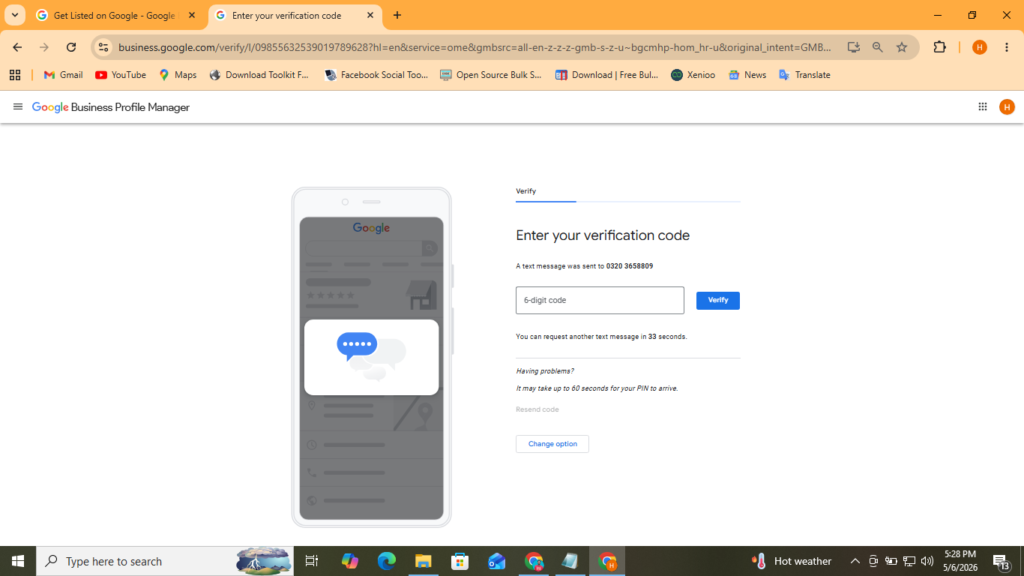
So after clicking on the next, it is showing me that Google has sent you a verification code.
After submitting the code, click on the verify, it will be verified. And within 24 hours, you google business profile will be live.
After that, you can add a list of all services you are providing, your business description, and working hours.
Google Business Profile Optimization Checklist from 0 to Calls in 30 Days
In this section, we will discuss all the possible ways to optimize your Google Business Profile for maximum ranking in local search results.
Creating GBP is a separate thing, and optimizing it for maximum ranking is a separate thing. So our purpose behind creating a business profile was to rank on Google Maps, so I am going to share with you exactly what you need to know.
Keyword in Business Profile Name:
Your business name is very important; adding a keyword creatively will result in more visibility for your business, relevance, and a higher ranking on Google Maps. In the picture below, you can see an example of my own agency business profile, where I am creatively using my main keyword. Now, let me clarify, please do not do keyword stuffing. It’s against Google Business Profile guidelines. You can use one main keyword related to your business, according to me and my experience. However, you can also do your own research.
Category of Business Profile:
Always choose the category for your business profile that resonates with your business the most. For example, in the image below, you can see that the category I have chosen for my agency, Sial Digital, is a Marketing Agency. And this is one of the reasons behind my ranking for “digital marketing agency near me”.So optimize your category that resonates with your business type the most.
Services in GBP:
Services allow you to add a list of keywords related to your services. For example, in the image below, you can see a list of all services I have listed related to my businesses. Now, here I want to clarify that I am adding only those keywords related to which you provide services.
Business Profile Description:
Your business profile not only helps in ranking but also improves conversion rate, which means more calls, leads, and sales. Profile description should be clear, like who you are, which services you provide, how you can help customers to solve their problems, plus your experience.
Below, I am sharing the picture of my business profile description.
Reviews:
Reviews build trust, authority, and social proof, so encourage your customers to leave honest and detailed reviews, such as which service they hired you for, in which location, and whether they are satisfied or not with your services. Dont get involved in black hat methods like buying a huge volume of reviews. You buisness profile can get suspended.
Photos:
Always use high-quality real images of your services, business, and products, as they increase trust and improve conversion rate. Do their SEO like renaming images with your business or service keyword, properly geo-tagging images which means you add latitude and longitude data in the image meta data, for that purpose you can upload your image to different free online image geo-tagging tools, and select the location which you want to add in the image, these tools will automately add geo meta data in your image, then you can download this image and upload to your buiness profile.
Now here is the assignment for you. Please try this strategy and let me know what the results were.
Posts:
Google Business Profile also allows you to add posts to your GBP. Always use high-quality images in posts; the post length should be a minimum of 500 to 600. Add your services keywords into the posts, and give a proper call to action. You can create posts related to your products, services, and customer projects, like how you work on customer projects.
By doing this, you can increase your chances of ranking in Google Maps.
My recommendation will be that yes, they help in GBP SEO, but they do not have as much effect as business name, website seo, category, and reviews have.
After doing all these optimizations, I am 100% sure you will see phenomenal improvement in your Google Business Profile ranking in the Google Map Pack. As I want to mention that i am not just a random guy teaching you local seo, I am a real practitioner of local seo strategies.
You can read the full case study of my agency and my agency Google Business Profile, how I ranked it at the top in Google Maps.
GBP Reviews and Reputation Management Pakistan:
Reputation is the backbone of all businesses. In today’s world, if you really want to grow your business at scale, you need a proper system. Most customers do proper research before buying products and services, so if you have a bad reputation, like low ratings, bad reviews, you have already lost a customer. Many businesses focus only on ranking, but a few really understand this game deeply and have proper systems and strategies for review and reputation management.
A free tip from me would be to improve your services and product quality, focus on customer experience, and make the review system very simple. Like after providing services, ask the customer for real feedback.
Google Maps SEO Strategy for Pakistani Business
So, till now I have taught you so much about Google Business Profile, now we will create a custom google map seo startegy for our local business. So, first, we need to make a Google Business Profile. We will try to use a high-volume main keyword in our GBP title, then we will add a category that best matches our business types, and after that, we will properly optimize our GBP Description and add services. After these basic optimizations, we will focus on getting reviews, building citations, and acquiring local backlinks from different local sources.
Although I am the biggest advocate that GBP contribute 70% in local seo but, for the rest of the part we need to make a local business website target our service plus city-level keywords, and focus on local content.
I have already covered how to make a complete google map seo strategy here.
Now, here I want to mention that whenever I am using GBP, its meaning is Google Business Profile.
5 Mistakes That Get Your GBP Suspended in Pakistan
Most people try to rush and implement black hat tactics so that they can rank higher in the Google map pack. But in that rush, they commit mistakes that lead to suspension of their Google business profile.
Keyword Stuffing:
Most people try to overuse and optimize their google business profile for that they stuff multiple keywords in the business name, which leads to suspension of the Google Business Profile.
Fake Reviews:
Instead of making a review strategy and reputation system, they invest in getting a huge volume of fake reviews, which gets detected by google AI system, which results in the suspension of GBP.
Fake Location:
Most of the people try to oversmarrt the Google and make different business profiles with fake locations with the goal to get calls, leads, and sales. But when Google detects it, it results in the removal from Google Maps.
Duplicate Listing:
Some try to make duplicate listings of already existed brand, where they are not operating, and sell the leads to different third-party companies. When people report to that listing, Google verifies, and that results in suspension of GBP.
Inconsistent NAP:
Many business do not keep their NAP consistent. On one citation, they use one address; on another citation, they use a different address. They confuse the Google algorithm, which leads to no ranking in Google Maps at all.
FAQS
How can Google Business Profile generate more leads?
If you list your business on Google Maps and optimize it properly for search queries that customers are searching related to your business, you can rank in the Google map pack 3, from there you can get more calls, leads, and sales. Google Business Profile works to increase your visibility in the local search and helps you to become a brand in the local market.
Can Google Maps bring customers without a website?
Yes, if optimized properly, Google Maps can get you more local cusotmer that you think about, without a website. It is my personal opinion based upon my experience that in most cases, Google Business Profile alone is enough to rank on Google Maps, but to get more quality results, you can create and add a website to your business profile.
Is Google Business Profile better than Facebook for local businesses?
Yes, 100%. Google Business Profile is far better than Facebook for local businesses, because most people search on Google when they need a service. So, for example, if I need a doctor, I will search “doctor near me” on Google, not on Facebook. So, yes, Google Business Profile is a better choice than me.
How much does Google Business Profile optimization cost in Pakistan?
It depends on the type of your business, your market, city, area, and the effort that it will take to rank you on top of Google local search results. I charge 10k pkr to 15pkr per client for Google Business Profile Optimization Services.
Is Google Business Profile important for small businesses in Pakistan?
Yes, Google Business Profile is very useful for small businesses in Pakistan because they can get free traffic, calls, leads, and sales from Google Business Profile once they rank it
Pingback: Local SEO Pakistan – Complete Guide to Ranking #1 in Google Maps Pack (2026) - Sial Digital
Pingback: Local SEO Pakistan - How I ranked Sial Digital at Google Map Pack 3 Case Study - Sial Digital
Pingback: Local Website SEO: Complete Guide to Optimizing Your Website for Local Search in Pakistan - Sial Digital